Claude Code is the interactive experience. The Claude Agent SDK is the programmable interface to the same agent loop, tools, and context management.
That distinction changes what we can build. Instead of opening a terminal and guiding one task by hand, we can place the agent inside a product, internal service, CI job, or document pipeline. Our application defines the goal and operational boundary. Claude decides which permitted actions to take, observes the results, and continues until the task is complete.
This is Part 2 of my Agentic Coding with Claude Code series. We will move from the concepts in Part 1 to the SDK primitives that make an agent work: query(), message streams, sessions, tools, and permissions.
Claude Agent SDK vs Claude Code
The SDK and Claude Code share the same underlying capabilities, but they serve different interfaces.
| Interface | Best fit | Who drives the interaction? |
|---|---|---|
| Claude Code CLI | Interactive development and one-off terminal tasks | A person works with Claude directly |
| Claude Agent SDK | Agents embedded in applications and automated processes | Application code starts, observes, and controls the run |
The Agent SDK is available for TypeScript and Python. It runs the agent loop in our process, so we do not have to implement the cycle of model calls, tool execution, and tool-result feedback ourselves.
This is also where a useful distinction appears. A workflow follows orchestration that our code defines. An agent dynamically chooses its next action and tool. A production system often combines both: our application owns the reliable outer workflow, while Claude owns the decisions inside a bounded agentic step.
query() Is the Entry Point
The main TypeScript SDK entry point is query():
1 | query({ |
The call has two important inputs:
promptdescribes the goal in natural languageoptionsconfigures the environment, including the model, working directory, tools, sessions, limits, and permission behavior
Unlike a conventional request that resolves to one response, query() returns a Query, an async generator of SDK messages. The application can observe assistant messages, tool calls, tool results, lifecycle events, and the final result as the agent works.
That stream provides operational visibility. It does not expose a transcript of Claude’s hidden chain-of-thought. We should build interfaces around observable actions, concise progress, results, cost, and errors instead.
A Minimal Read-Only Agent
Here is a complete TypeScript example that asks Claude to summarize one file:
1 | import { query } from "@anthropic-ai/claude-agent-sdk"; |
The prompt defines the outcome. The scoped rule auto-approves Read only for api-guide.md, and dontAsk denies anything that was not pre-approved instead of prompting. The turn and cost limits bound the run, while the catch handles SDK failures. Tune those limits for the size of the real document. Because the file path is known, the agent does not need Glob, Grep, Write, or Bash.
There is a subtle but important rule here: allowedTools is an approval list, not a complete capability boundary. Unlisted tools can still fall through to the active permission mode. Pairing a narrow allowedTools list with dontAsk, or explicitly blocking tools with disallowedTools, creates the predictable boundary that headless automation needs.
A Sketchnote of the SDK
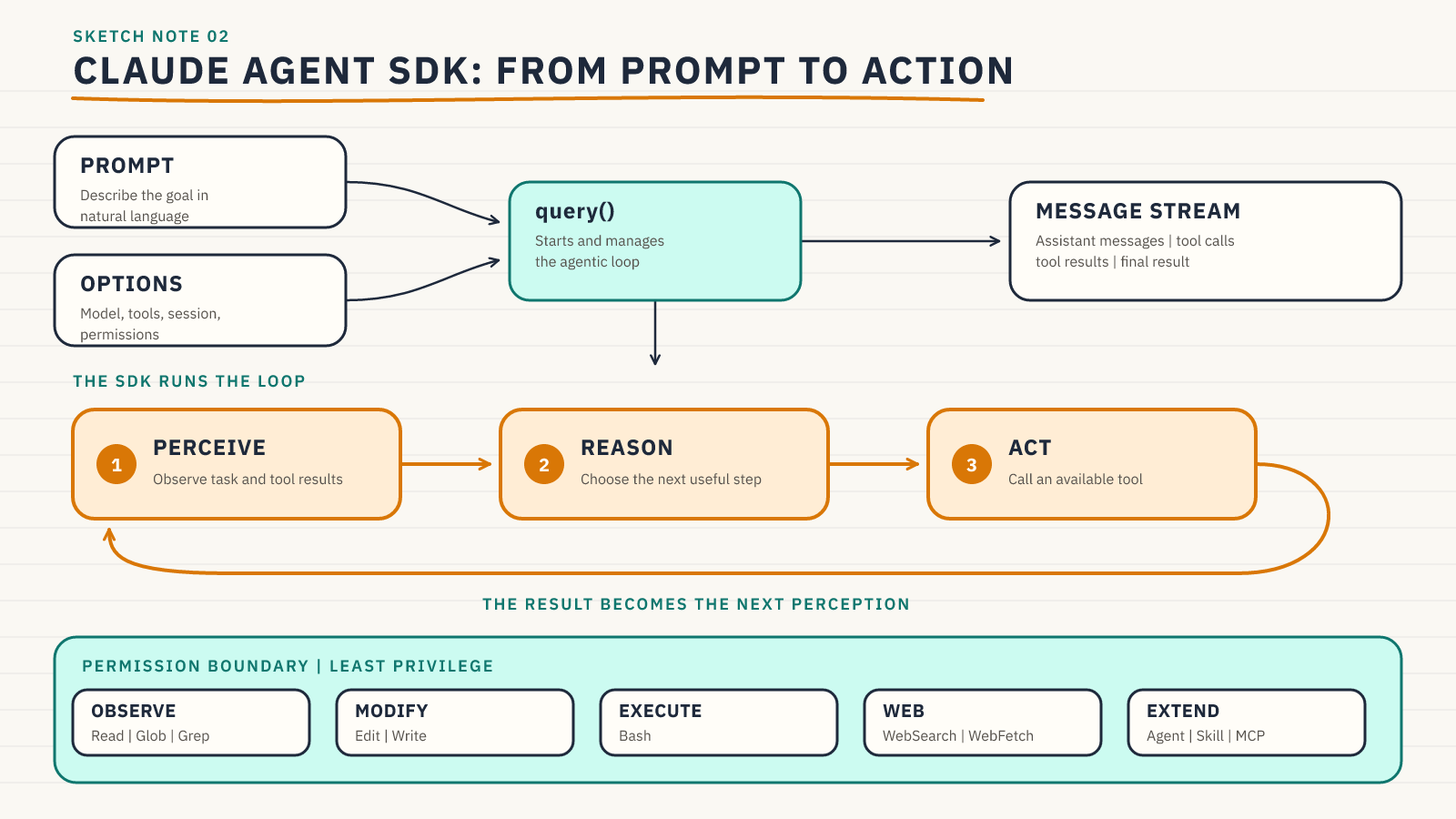
The application starts the run and consumes its message stream. Inside that boundary, the SDK keeps feeding tool results back to Claude until the goal is complete or a configured limit stops the run.
How the SDK Runs the Agentic Loop
Suppose the goal is:
1 | Summarize api-guide.md. |
The loop can unfold like this:
- Perception: Claude receives the goal and sees that
Readis available. - Reasoning: It determines that it needs the document before it can summarize it.
- Action: It calls
Readforapi-guide.md. - Perception: The file content returns as a tool result.
- Reasoning: Claude identifies the important decisions, examples, and structure.
- Action: It returns the summary as the final result.
For a larger task, this cycle can repeat many times within one query() call. The SDK handles the model-tool-model exchange and streams each observable step back to the application.
Tools Define What the Agent Can Do
Tools turn the model’s decisions into grounded actions.
| Category | Common tools | Capability |
|---|---|---|
| Observe | Read, Glob, Grep |
Inspect files and search the workspace |
| Modify | Edit, Write |
Change or create files |
| Execute | Bash |
Run commands and programs |
| Web | WebSearch, WebFetch |
Search for and retrieve online information |
| Extend | Agent, Skill, MCP tools |
Delegate focused work or load specialized capabilities |
The current SDK calls the subagent tool Agent; Task remains accepted as a compatibility alias. Skills can be made available with the skills option, while MCP connects tools and data sources that the built-in set does not cover.
Tool names are not a security model by themselves. A safe deployment combines a narrow tool surface with permission rules, filesystem or process isolation, hooks where every call must be checked, and application-level validation of the final result.
Permission Modes Set the Autonomy Level
Permission modes determine what happens when Claude requests a tool.
| Mode | Behavior | Typical use |
|---|---|---|
default |
Unmatched tools reach the application’s approval callback | Interactive approval flows |
dontAsk |
Anything not pre-approved is denied | Fixed, headless agents |
acceptEdits |
File edits and common filesystem operations are auto-approved | Trusted work in an isolated directory |
plan |
Claude explores and plans while write operations require approval | Analysis before implementation |
auto |
A model classifier decides permission prompts where available | Environments that support classified approvals |
bypassPermissions |
Most tool calls run without prompts | Fully isolated, trusted automation only |
bypassPermissions requires an additional explicit opt-in and gives Claude broad system access. Even then, hooks and deny rules can still block calls. It should be the exception, not the default.
The practical least-privilege sequence is:
- Start with the exact tools the task requires.
- Deny or omit capabilities that should never be used.
- Choose the most restrictive permission mode that still lets the task finish.
- Add sandboxing and hooks when the environment needs stronger enforcement.
- Expand authority only after a real workflow proves that it needs more.
Sessions Carry Context Across Queries
A single query() can take many agentic turns. Sessions matter when separate queries need to share context.
The TypeScript SDK supports three useful paths:
continue: trueresumes the most recent session for the current directory and fits apps that run one conversation at a time thereresume: sessionIdreturns to a specific sessionresume: sessionIdwithforkSession: truebranches the conversation into a new session while preserving the original
Do not use continue: true to identify state in a concurrent or multi-user service. Capture the session ID from each run and pass the correct ID through resume for that user or job.
A session contains prompts, responses, tool calls, and tool results. It does not snapshot the filesystem. If two resumed or forked sessions operate in the same directory, they still see the same real files unless we isolate or checkpoint them separately.
That difference matters in production. Conversation state helps Claude remember what it learned. Application state must still own durable business facts, authorization, idempotency, and the status of external work.
From One Query to a Real Workflow
A document-standardization process shows how the pieces combine. Imagine a directory of contracts that must be converted into a consistent internal format.
The outer workflow can:
- Place copies of the source documents in an isolated working directory.
- Start
query()with a precise output schema and validation rules. - Allow read tools for the inputs and write access only to a dedicated output directory.
- Stream progress and tool activity into the application’s audit log.
- Validate the generated documents before accepting them.
- Route exceptions and final legal approval to a human reviewer.
Within that workflow, the agent can decide which document to inspect next, how to map inconsistent sections, and when it needs more context. The application still owns the non-negotiable sequence, permissions, validation, and approval boundary.
This is the pattern to aim for: dynamic reasoning inside deterministic controls.
Apply Your Skills
Pick a repetitive process from your work, such as compiling a weekly report, preparing release notes, or onboarding a teammate. Write down:
- What outcome should one
query()own? - Which tools are strictly necessary?
- Which actions must be denied, sandboxed, or approved?
- What messages should the application surface to a human?
- What belongs in the SDK session, and what must live in application storage?
- Which validations prove that the final result is safe to use?
Then implement the smallest read-only version first. Add modification or execution tools only when the workflow has a concrete need for them.
Key Terms
- Claude Agent SDK: The TypeScript and Python library that exposes Claude Code’s agent loop, tools, and context management to applications
query(): The primary SDK function that starts an agent run and returns an asynchronous message streamQuery: The async generator returned byquery(), with streamed SDK messages and controls for the active run- Agentic loop: The repeating perception, reasoning, and action cycle managed by the SDK
- Tool: A capability Claude can call to observe or change its environment
- Permission mode: The global policy that controls how unmatched tool requests are approved, denied, or escalated
- Least privilege: Giving an agent only the authority required for its current goal
- Session: Persisted conversation history containing prompts, messages, tool calls, and tool results
- Resume: Continue a specific prior session by its ID
- Fork: Create a new session from an existing history without changing the original conversation
Final Thoughts
The Claude Agent SDK turns the interaction model of Claude Code into a programmable building block. query() gives us a goal-driven agent loop, tools give it capabilities, the message stream gives us observability, sessions give it continuity, and permissions define its operating boundary.
The strongest systems do not maximize autonomy. They give Claude enough room to reason and adapt inside controls that remain understandable, testable, and owned by the application.
The next post will go deeper into context engineering: how project instructions, scoped rules, skills, and tool descriptions shape the decisions an agent makes.
This is Part 2 of the Agentic Coding with Claude Code series.
Comments