A few of my coding-agent seats started reporting connection failed. Not all of them. Not all the time. Just enough to stall work for hours.
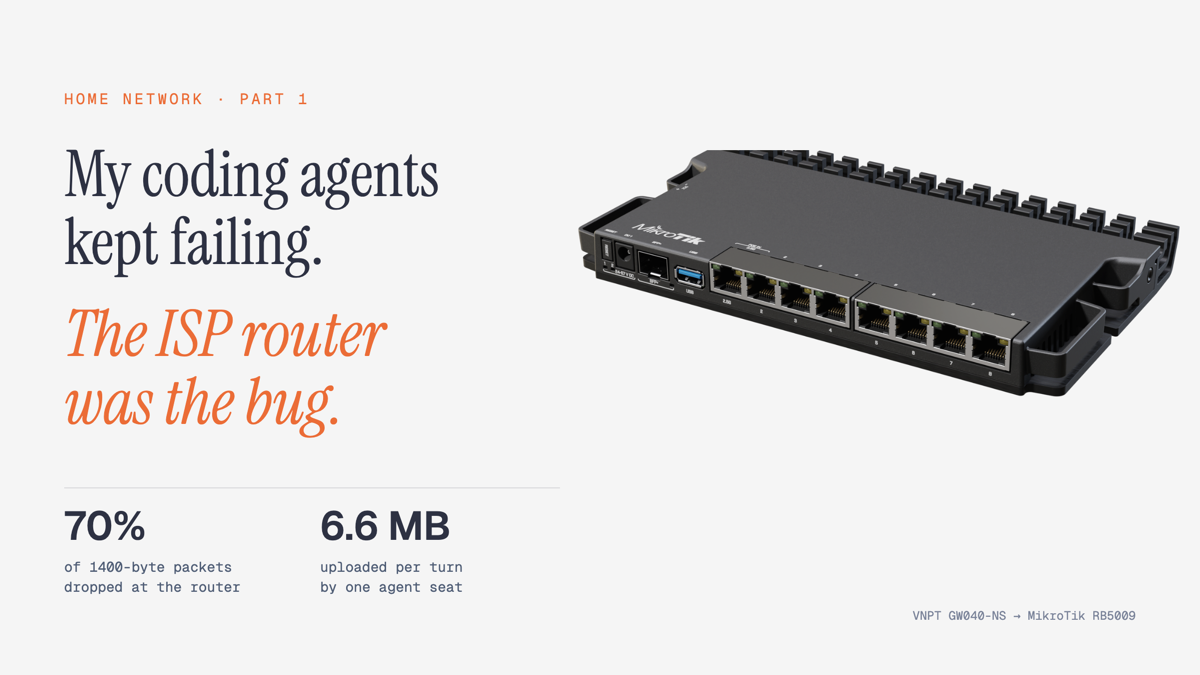
The bug was not in the agents, the model provider, or the gateway in front of them. It was the ISP router at home: a VNPT iGate GW040-NS that had started dropping most full-size packets.
This is Part 1: how I found it, what I measured, what I’m replacing it with, and the setup plan. Part 2 covers the real cutover once the hardware is on my desk.
The setup
Two always-on machines at home run my agent seats: a Linux box and a Mac mini. Both talk to an LLM gateway (CLIProxyAPI) on a small k3s cluster outside the house. Everything else is a normal family network: a Proxmox server, a NAS, my MacBook, my wife’s PCs and phones, and a handful of smart-home devices.
All of it hangs off one box from the ISP.
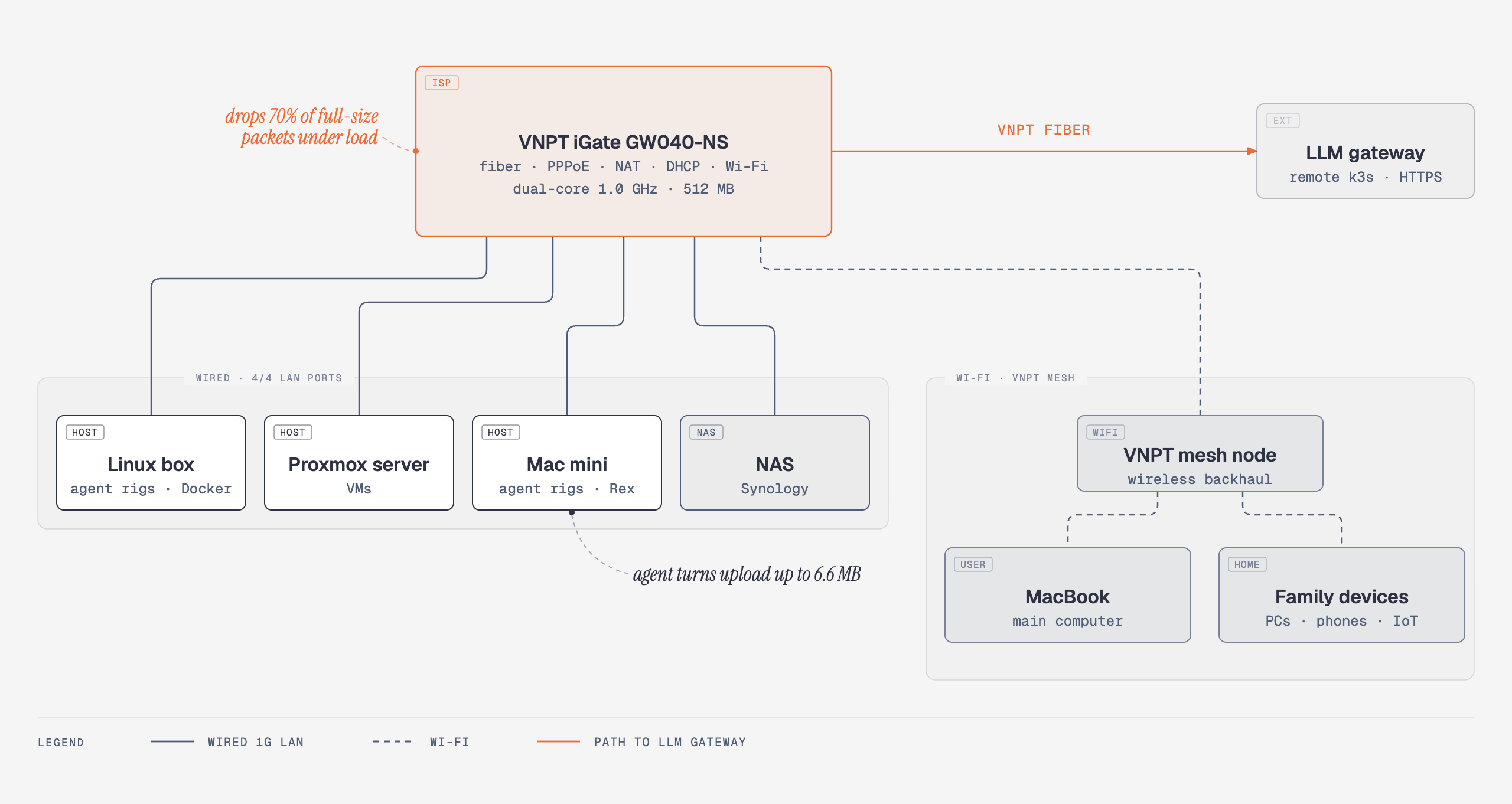
The GW040-NS is the fiber terminal, the PPPoE client, the NAT, the DHCP and DNS server, and the Wi-Fi access point, on a dual-core 1.0 GHz ARM with 512 MB of RAM (VNPT Technology spec). All four of its LAN ports are in use.
The symptom
From the agent side: connection failed, then a retry, sometimes a stuck turn.
From the gateway side, the logs had a pattern:
1 | 400 | 2m20s | POST "/v1/responses" |
A 400 after two minutes is not a model error. The gateway was still reading the request body when the connection died. One failed request declared Content-Length: 6556360, and the gateway had received about 3.7 MB of it.
False lead 1: a deployment
My first guess was a gateway upgrade. The image had moved from v8.0.41 to v8.0.47 that week.
The numbers said no. Counting those slow unexpected EOF errors per window (GMT+7):
| Window | Successful requests | Cut-off uploads | Gateway version |
|---|---|---|---|
| Oct 27 17:00 → Oct 28 17:00 | 11,700 | 0 | v8.0.41 |
| Oct 28 17:00 → Oct 29 11:00 | 12,100 | 58 | v8.0.41 |
| Oct 29 11:00 → Oct 30 11:00 | 19,900 | 1,677 | v8.0.41 |
| Oct 30 11:00 → Nov 1 05:00 | 24,000 | 0 | v8.0.41 |
| Nov 1 05:00 → Nov 2 01:30 | 13,900+ | 318 | v8.0.41, then v8.0.47 |
The same version had the worst stretch and then 42 clean hours at normal traffic. The latest wave started an hour before the upgrade rolled out. Nothing was deployed when the big wave began.
False lead 2: “only some seats are broken”
At first only one seat failed: a QA reviewer. That looked like a seat bug.
It was a size bug. Coding agents resend their whole conversation every turn, and that QA seat had screenshots in its context. Each turn uploaded about 6.6 MB. The other seats sent well under 1 MB.
As the network got worse, the smaller seats started failing too. The last ten failures before the fix all came from my home connection, with request bodies from 0.28 MB to 6.6 MB. Big uploads fail first. Then everything does.
The measurement
Two tests settled it, both run from the Linux box and the Mac mini:
- Ping with small and full-size packets. Small pings lie. A 56-byte ping got through almost every time. A 1400-byte ping often didn’t.
- A real upload. Download was fine at 10 MB/s. Upload was not.
| Test | Linux box | Mac mini |
|---|---|---|
| 56-byte ping → router, loss | 3% | 10% |
| 1400-byte ping → router, loss | 77% | 70% |
| 1400-byte ping → gateway cluster, loss | 57% | 70% |
| 6 MB upload | 4 KB/s, did not finish | 13 KB/s, did not finish |
The packet loss started at the first hop: the router itself. The Linux box and the Mac mini pinged each other with 0% loss, and a laptop on another network reached the gateway cluster with 0% loss. Both hosts are wired at 1 Gbps, and the Linux box showed zero interface errors.
So it was not the machines, the cables between them, the gateway, or the model provider. It was the GW040-NS.
The fix that only buys time
I restarted the router.
| Test | Before restart | After restart |
|---|---|---|
| 1400-byte ping → router | 70–77% loss | 0% |
| 1400-byte ping → gateway cluster | 57–70% loss | 0% |
| 6 MB upload | 4–13 KB/s | 5.6–8.5 MB/s |
The gateway logged no new cut-off uploads after that. The last few errors were requests that had started before the restart and timed out afterwards.
Two hours later, upload from the same machines was already down to 0.2–0.4 MB/s again, still without packet loss. A restart resets the box. It does not fix it.
My best explanation: the GW040-NS does NAT for every long-lived connection on the network (agent streams, Tailscale, remote desktop, sync) on a small CPU, and it degrades until it is restarted. I can’t see inside it, so I’m not going to keep guessing. I’m moving the routing off it.
The plan
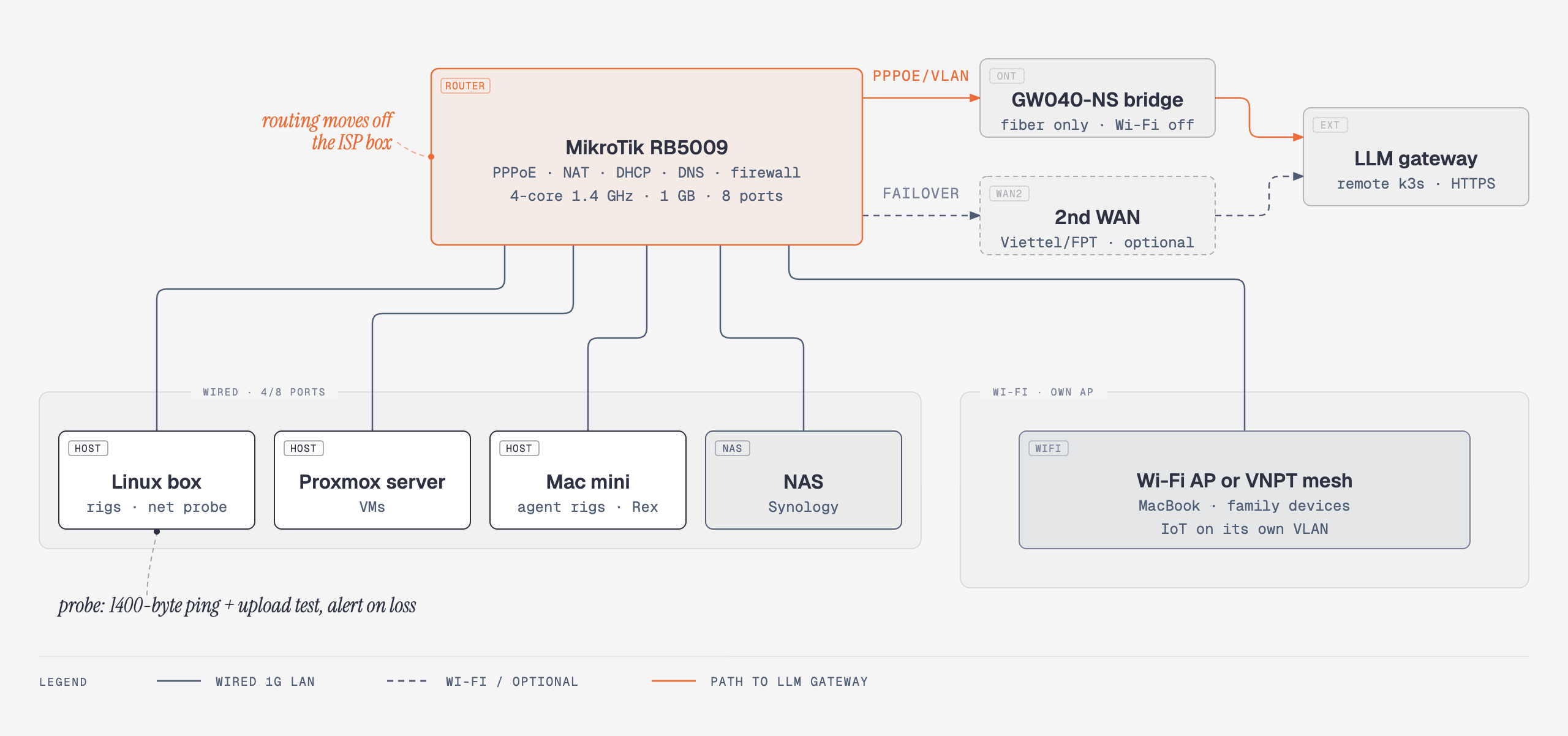
Keep the VNPT box for the one thing it has to do: terminate the fiber. Put the GW040-NS in bridge mode and let a real router do PPPoE, NAT, DHCP, DNS, and the firewall.
Two extras while I’m at it:
- A second WAN (Viettel or FPT) with automatic failover, so one ISP box can’t take every agent down again.
- A probe on the Linux box that runs full-size pings and a real upload test every few minutes and alerts me. This time the network was bad on and off for four days before I knew why.
Choosing the router
Requirements: PPPoE on gigabit fiber without breaking a sweat, lots of concurrent NAT sessions, at least 6 ports, multi-WAN, and config I can keep in git.
| VNPT GW040-NS (today) | MikroTik hEX S 2025 | TP-Link ER605 v2 | UniFi Cloud Gateway Ultra | MikroTik RB5009 | |
|---|---|---|---|---|---|
| CPU | dual-core ARM 1.0 GHz | dual-core 950 MHz | not published | quad-core A53 1.5 GHz | quad-core ARMv8 1.4 GHz |
| RAM | 512 MB | 512 MB | not published | 3 GB | 1 GB |
| Ports | 4× 1G LAN | 5× 1G + 2.5G SFP | 5× 1G | 1× 2.5G WAN + 4× 1G | 7× 1G + 1× 2.5G + 10G SFP+ |
| Multi-WAN | no | yes | up to 4 WAN | up to 4 WAN | yes, any port |
| Managed via | ISP web UI | RouterOS | Omada web/cloud | UniFi app | RouterOS (CLI, scriptable) |
| Price in Vietnam | from the ISP | 2.16–2.5M VND | 1.15–1.63M VND | 3.07–3.95M VND | 5.59–6.12M VND |
Prices were checked on November 2, 2026, VAT included, from Vietnamese shops (links below). They move often.
Why not the cheaper ones. The hEX S is in the same CPU and RAM class as the box I’m replacing. The ER605 is fine for a small office, but shops rate it for about 50–60 users, and I’m already near that once phones and IoT count.
Why not UniFi. The UCG-Ultra is the easiest good option here, and the one I’d recommend to most people. I want RouterOS config I can export, diff, and keep in git, and more than four LAN ports.
Why the RB5009. Quad-core, 1 GB RAM, eight copper ports plus 10G SFP+, and any port can be a WAN. In MikroTik’s own all-port test it routes 9.8 Gbps with 1518-byte packets. Far more than one gigabit fiber line needs, which is the point. MikroTik’s suggested price is $219.
Port plan
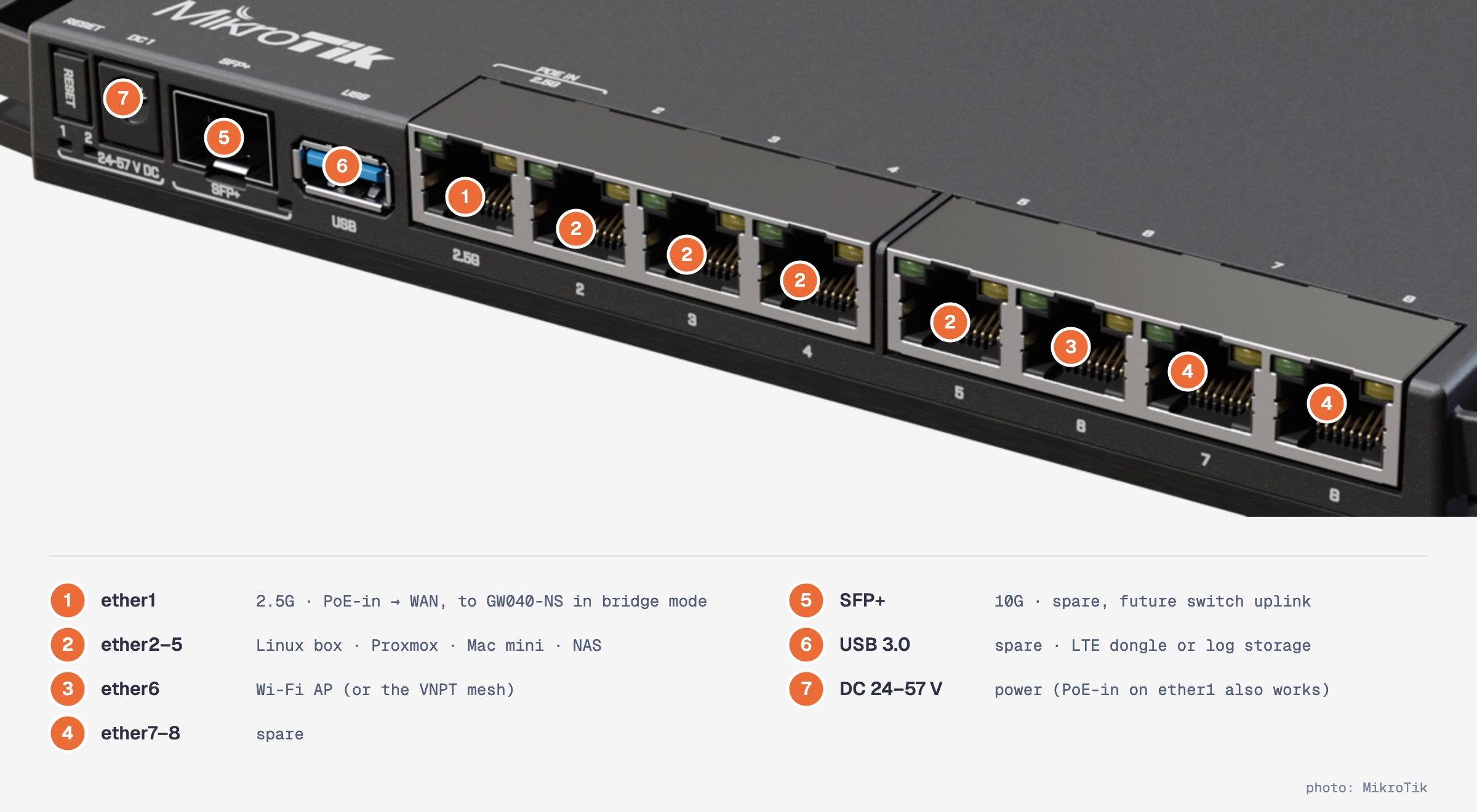
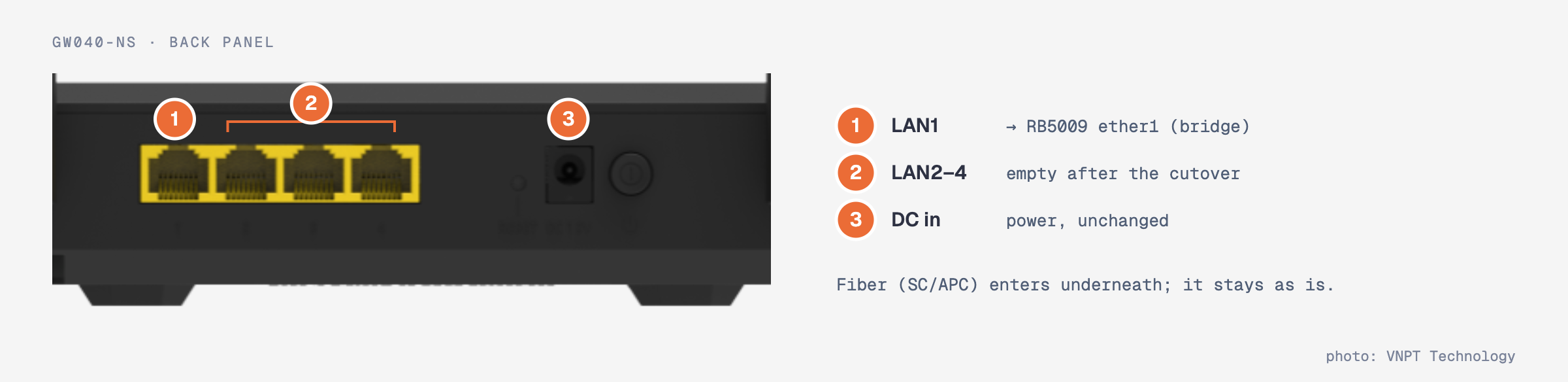
On the VNPT side, only one LAN port stays in use:
Where to buy
| Shop | Price (VAT incl.) | Notes |
|---|---|---|
| T2QWIFI | 5,590,000 VND | Ho Chi Minh City |
| TIC | 6,120,000 VND | |
| An Phát | ask | large retailer |
Ask for official stock (hàng chính hãng) with a 12-month warranty. If you go UniFi instead, the UCG-Ultra was 3.07–3.95M VND at AKAS, Techonline, Siêu Thị Máy Chủ, and Khánh Hân.
Setup plan
This is the plan I’ll execute in Part 2. The RouterOS commands are a draft against the RB5009 default configuration on RouterOS v7. Part 2 will have the tested version and screenshots.
1. Collect what VNPT knows
Call VNPT (18001091) or read the GW040-NS WAN page, and write down:
- the PPPoE username and password (the router UI usually masks the password; VNPT can give it to you),
- the Internet VLAN ID on the WAN connection,
- whether you use MyTV or a VNPT phone line. Each needs its own VLAN. I use neither.
You can also ask VNPT to put the box in bridge mode for you.
2. Stage the RB5009 on the bench
Do all of this before touching the live network, with only a laptop plugged in.
1 | # Update RouterOS (reboots), then the RouterBOOT firmware (reboot once more) |
The default config already gives you a LAN bridge (ether2–8 and the SFP+), a DHCP server, a firewall that drops unsolicited WAN traffic, FastTrack, and NAT for anything leaving the WAN interface list. Keep it and adjust.
Move the LAN to its own subnet, because the GW040-NS usually keeps 192.168.1.1 for its admin page even in bridge mode. Run this block from Winbox connected by MAC address: changing the bridge address drops an IP session halfway through.
1 | /ip address set [find interface=bridge] address=192.168.10.1/24 |
3. WAN: PPPoE on ether1
1 | /ip dhcp-client remove [find interface=ether1] |
If the GW040-NS bridge passes the VLAN tag through instead of stripping it, move the PPPoE client onto a VLAN interface:
1 | /interface vlan add name=vlan-vnpt interface=ether1 vlan-id=<vlan-id> |
Keep the VNPT admin page reachable from the LAN:
1 | /ip address add address=192.168.1.2/24 interface=ether1 comment="GW040 admin" |
VNPT also hands out IPv6. Ask for a prefix over PPPoE and advertise it on the LAN:
1 | /ipv6 dhcp-client add interface=pppoe-vnpt request=prefix pool-name=vnpt-v6 add-default-route=yes |
Save a baseline before the cutover:
1 | /system backup save name=pre-cutover |
On RouterOS v7, /export leaves passwords out unless you ask for them, so that file can go into git. The .backup file holds every secret, including the PPPoE password: keep it off git.
4. The cutover
- On the GW040-NS: delete the PPPoE WAN, create a Bridge WAN with the same VLAN, bind it to LAN1, then turn off its DHCP server and Wi-Fi. Menu names vary by firmware.
- Cable it: GW040 LAN1 → RB5009 ether1. Linux box, Proxmox, Mac mini, NAS → ether2–5. Wi-Fi AP → ether6.
- Watch PPPoE come up:
/interface pppoe-client monitor pppoe-vnpt once. - Move the hosts with static addresses to
192.168.10.0/24.
One open question for Wi-Fi: my VNPT mesh node backhauls over Wi-Fi to the GW040-NS. With the GW040’s Wi-Fi off, it loses that uplink. Either it gets wired to ether6 as an access point, or it gets replaced with a proper AP. Part 2 will say which.
Rollback: recreate the PPPoE WAN on the GW040-NS with the credentials from step 1 and plug the hosts back into it. That is quick as long as the credentials are written down.
5. Prove it, then keep proving it
The same tests as before, from the Linux box and the Mac mini:
1 | ping -c 40 -s 1400 -q <gateway-host> # expect 0% loss |
Then automate it. This is the probe I’ll run on the Linux box every five minutes:
1 | #!/usr/bin/env bash |
1 | # /etc/systemd/system/net-probe.service |
1 | sudo install -m 755 net-probe.sh /usr/local/bin/net-probe.sh |
Every five minutes, a 2 MB upload adds up to about 576 MB a day. Fine on home fiber, but worth knowing.
I ran this probe on the current setup while finishing this post, about two and a half hours after the restart. It reported 5% loss on full-size packets and 82 KB/s upload, and exited non-zero. The box is sliding again.
What I’d tell past me
- Small pings lie. Test with full-size packets (
ping -s 1400) and a real upload, not justping 1.1.1.1. - Agents are upload-heavy. They resend the whole context every turn, so a degraded uplink hits them first, and the seat with the biggest context fails before anyone else.
- Read the status code and the duration together. A
400after two minutes on a large body is a transport problem dressed up as a validation error. - Check what changed before blaming a deploy. The same gateway version had both the worst day and 42 clean hours.
Part 2: the RB5009 arrives, the VNPT box goes into bridge mode, and the same tests run again.
Comments